CFD'ler karmaşık araçlardır ve kaldıraç nedeniyle hızlı para kaybetme riski yüksektir. Yatırım yapmadan önce CFD'lerin nasıl çalıştığını anlayıp anlamadığınızı değerlendirmelisiniz.

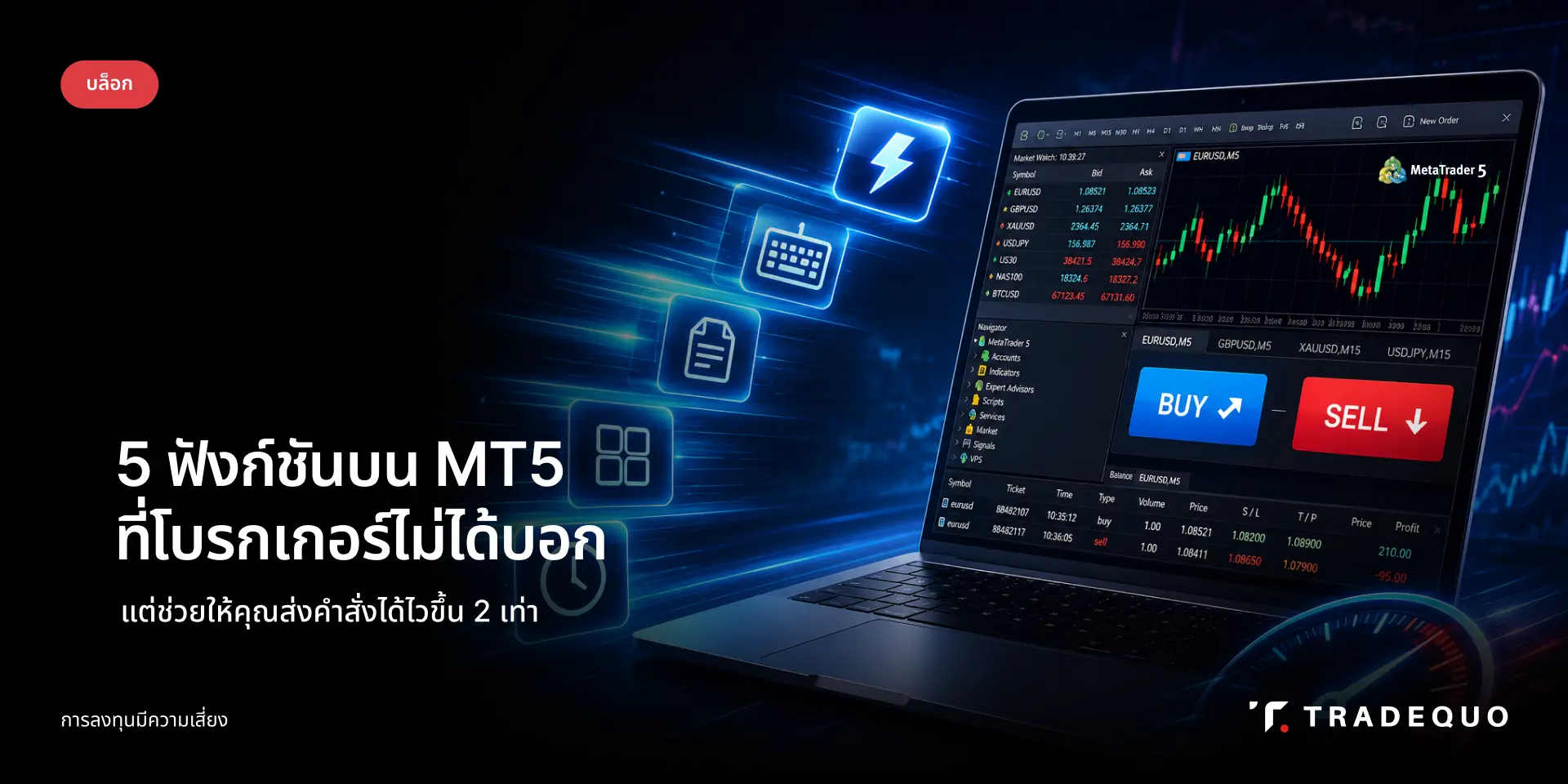
5 ฟังก์ชันบน MT5 ที่โบรกเกอร์ไม่ได้บอก แต่ช่วยให้คุณส่งคำสั่งได้ไวขึ้น 2 เท่า

tarafından

5 ฟังก์ชัน MT5 ที่แนะนำให้เปิดใช้งานทันที

นักเทรดส่วนใหญ่ใช้ MT5 มาหลายปีโดยไม่รู้ว่าแพลตฟอร์มซ่อนฟีเจอร์บางอย่างไว้ที่สามารถเปลี่ยน Execution Workflow ได้อย่างสิ้นเชิง ได้แก่ One-Click Trading, Hotkey Customization, Trade Panel, Order Template และ Quick Trade Bar ทั้ง 5 อย่างนี้สามารถลดเวลาการส่งคำสั่งจากหลายวินาทีเหลือไม่กี่วินาที และทุกฟีเจอร์ใช้งานได้เลยบน TradeQuo MT5 โดยไม่ต้องติดตั้งอะไรเพิ่ม


5 ฟังก์ชัน MT5 ที่แนะนำให้เปิดใช้งานทันที

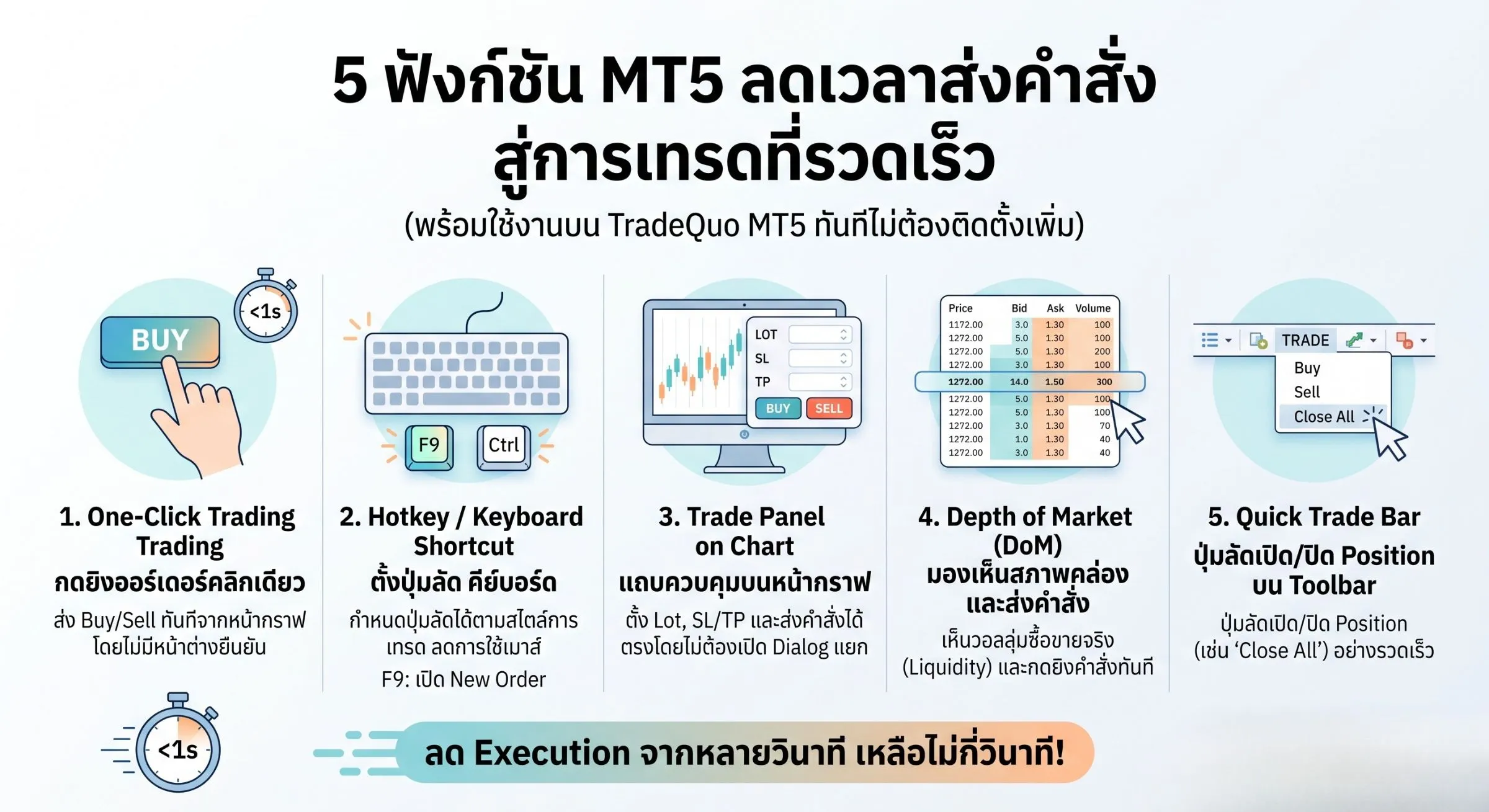
  1. One-Click Trading ส่ง Order ได้ทันทีจากกราฟโดยไม่ต้องกดยืนยัน

  2. Hotkey / Keyboard Shortcut ตั้งปุ่มลัดเองได้ตามสไตล์การเทรด

  3. Trade Panel บน Chart ควบคุม Lot, SL/TP ได้โดยตรงบนหน้ากราฟ

  4. Depth of Market (DoM) มองเห็นสภาพคล่องและส่งคำสั่งในคลิกเดียว

  5. Quick Trade Bar ปุ่มลัด Open/Close Position บน Toolbar


ทำไมนักเทรดส่วนใหญ่ถึงยังส่งคำสั่งช้าทั้งที่ใช้ MT5?

ปัญหาไม่ได้อยู่ที่ความเร็วอินเทอร์เน็ต หรือสเปกคอมพิวเตอร์ แต่อยู่ที่ Workflow ที่ยังเปิด Order Dialog ทีละขั้นตอนซึ่งกินเวลาเฉลี่ย 3–5 วินาทีต่อออร์เดอร์ ในตลาดที่ราคาขยับไวทุกมิลลิวินาที นั่นหมายความว่าคุณกำลังเสีย Entry ที่ดีไปโดยไม่รู้ตัว


ความแตกต่างระหว่างการส่งคำสั่ง 'แบบเดิม' กับ 'แบบเร็ว'

แบบเดิม: คลิกขวาบนกราฟ → New Order → ตั้ง Volume → ตั้ง SL/TP → กด Buy/Sell — ใช้เวลาราว 4–6 วินาที

แบบเร็ว: กด Hotkey + คลิกเดียวบน Trade Panel — ใช้เวลาไม่ถึง 1 วินาที

ความต่างของ 5 วินาทีอาจดูเล็กน้อย แต่ใน Scalping หรือช่วง High Volatility มันคือส่วนต่างระหว่างกำไรและขาดทุนทันที


5 ฟังก์ชัน MT5 ที่ช่วยเพิ่มความเร็วในการเทรด
5 ฟังก์ชัน MT5 ที่ช่วยเพิ่มความเร็วในการเทรด


1. One-Click Trading เปิดออร์เดอร์ได้ในพริบตา

One-Click Trading คือฟีเจอร์ที่ให้คุณส่งคำสั่ง Buy หรือ Sell ได้ทันทีจากหน้ากราฟโดยไม่มีหน้าต่างยืนยันขึ้นมาขัด เหมาะอย่างยิ่งสำหรับ Scalper และนักเทรดที่ต้องการ Execution เร็ว

วิธีเปิด One-Click Trading บน MT5 ปี 2026

•        เปิด Chart ที่ต้องการ → คลิก Tools → Options → Trade

•        ติ๊กถูก 'One-Click Trading' → กด OK

•        จะปรากฏปุ่ม Ask/Bid มุมซ้ายบนของกราฟพร้อมใช้งานทันที

ข้อควรระวัง: เมื่อเปิดใช้งานแล้วจะไม่มีหน้าต่างยืนยัน ให้ตรวจสอบ Lot Size ก่อนเสมอ


2.Hotkey & Keyboard Shortcut ควบคุมด้วยนิ้วเดียว

MT5 มี Shortcut ติดตั้งมาให้แล้วหลายชุด และยังปรับแต่งเพิ่มเองได้ตามสไตล์ ช่วยให้ไม่ต้องเอามือออกจากคีย์บอร์ดเพื่อคลิก Mouse เลย

รายการ Hotkey MT5 ที่ใช้บ่อยที่สุดในปี 2026

  • F9 เปิดหน้าต่าง New Order

  • Ctrl+T เปิด/ปิด Trade Terminal

  • Ctrl+G แสดง/ซ่อน Grid บน Chart

  • Delete ลบ Object ที่เลือกบน Chart

  • Alt+F4 ปิดกราฟปัจจุบัน


3.Trade Panel บน Chart ส่งคำสั่งโดยไม่ต้องเปิด Dialog

Trade Panel คือแถบควบคุมที่ฝังอยู่บนหน้ากราฟโดยตรง ให้คุณตั้ง Lot Size, SL, TP และส่งคำสั่งได้โดยไม่ต้องเปิดหน้าต่างแยก

ตั้งค่า Trade Panel ให้เหมาะกับสไตล์การเทรดของคุณ

  • คลิกขวาบน Chart → One-Click Trading → แสดง Trade Panel

  • ตั้ง Default Lot ที่ใช้บ่อยไว้ล่วงหน้าเพื่อประหยัดเวลา

  • ใช้ร่วมกับ One-Click Trading เพื่อ Workflow ที่เร็วที่สุด


4. Depth of Market (DoM) มองเห็นสภาพคล่องและส่งคำสั่งในคลิกเดียว

Depth of Market (DoM) หรือหน้าต่างแสดงความลึกของตลาด เป็นฟีเจอร์ระดับโปรที่มีบน MT5 (ซึ่งไม่มีใน MT4) ฟังก์ชันนี้จะแสดงปริมาณความต้องการซื้อ (Bid) และขาย (Ask) ในแต่ละระดับราคาแบบ Real-time ช่วยให้นักเทรดแนว Scalping หรือ Day Trader มองเห็นแนวรับ-แนวต้านจากวอลลุ่มจริงในตลาด และสามารถกดส่งคำสั่งซื้อขายหรือตั้ง Pending Order ได้ทันทีจากหน้าต่างนี้โดยไม่ต้องเปิดหน้าต่างอื่นขึ้นมาขัดจังหวะ

วิธีเปิดและใช้งาน Depth of Market บน MT5

  • คลิกขวาบนหน้าจอ Chart ที่ต้องการ → เลือก Depth of Market (หรือใช้คีย์บอร์ดลัด Alt + B)

  • หน้าต่าง DoM จะปรากฏขึ้นมา แสดงตารางราคาพร้อมปริมาณ Volume (Liquidity) ของฝั่งซื้อและฝั่งขาย

  • ตั้ง Lot Size ที่ต้องการด้านล่าง จากนั้นสามารถคลิกที่ลูกศรหรือช่องราคาในตารางเพื่อส่งคำสั่ง Buy/Sell หรือตั้งราคาล่วงหน้าได้ทันที


5.Quick Trade Bar ปุ่มลัดเปิด/ปิด Position บน Toolbar

Quick Trade Bar คือแถบเครื่องมือด้านบนที่มีปุ่ม Buy/Sell/Close All ให้กดได้โดยตรง เหมาะกับ Scalper ที่ต้องการปิด Position ทั้งหมดอย่างรวดเร็วในสภาวะที่ตลาดผันผวนสูง

H4 เปิดใช้งาน Quick Trade Bar บน MT5 ใน 3 ขั้นตอน

•        ไปที่ View → Toolbars

•        ติ๊กถูก 'Trade'

•        แถบ Quick Trade จะปรากฏด้านบนพร้อมใช้งานทันที


Workflow ที่แนะนำสำหรับนักเทรดที่ต้องการลด Execution Time

เริ่มต้นด้วยการเปิด Trade Panel บน Chart และตั้ง Default Lot ไว้ก่อนเริ่มเซสชัน จากนั้นโหลด Order Template ที่ตรงกับ Setup ของวันนั้น เมื่อสัญญาณมาให้ใช้ Hotkey เปิด Panel แล้วส่งคำสั่งผ่าน One-Click Trading หากต้องปิด Position ฉุกเฉินให้กด Quick Trade Bar ทันที ทั้งหมดนี้ใช้เวลาไม่ถึง 1 วินาที

TradeQuo รองรับ MT5 เต็มรูปแบบพร้อมฟีเจอร์ MT5 ทั้ง 5 นี้ตั้งแต่วันแรกที่เปิดบัญชี ไม่ต้องติดตั้งเพิ่มเติม


สรุป: ปลดล็อก MT5 ให้เต็มประสิทธิภาพในวันนี้

• One-Click Trading ส่ง Order โดยไม่มีหน้าต่างขัด

• Hotkey ควบคุมทุกอย่างจากคีย์บอร์ด

• Trade Panel ตั้งค่าและส่งคำสั่งจากหน้ากราฟ

• Order Template โหลด Setup ที่บันทึกไว้ในคลิกเดียว

• Quick Trade Bar ปิด Position ฉุกเฉินได้ทันที

เริ่มเทรดบน MT5 กับโบรกเกอร์ TradeQuo และปลดล็อกทุกฟีเจอร์เหล่านี้ได้เลยตั้งแต่วันแรก 


FAQ คำถามที่พบบ่อย

Q: One-Click Trading บน MT5 ปลอดภัยไหม?

A: One-Click Trading บน MT5 ปลอดภัยสำหรับนักเทรดที่เข้าใจความเสี่ยงและตั้งค่า Lot Size ไว้อย่างระมัดระวังแล้ว เนื่องจากไม่มีหน้าต่างยืนยันก่อน Execute ทางที่ดีควรตั้ง Default Lot ให้ต่ำไว้ก่อน และเพิ่มตาม Position Sizing ที่วางแผนไว้เสมอ

Q: MT5 กับ MT4 ใช้ Hotkey เดียวกันไหม?

A: MT5 และ MT4 มี Hotkey บางส่วนที่เหมือนกัน เช่น F9 สำหรับ New Order แต่ MT5 มี Shortcut เพิ่มเติมที่ MT4 ไม่มี โดยเฉพาะส่วนที่เชื่อมกับ Trade Panel และ Depth of Market ซึ่งเป็นฟีเจอร์เฉพาะของ MT5

Q: Order Template บน MT5 ใช้กับทุกโบรกเกอร์ได้ไหม?

A: Order Template เป็นฟีเจอร์ของ MT5 Platform ที่ใช้ได้กับโบรกเกอร์ทุกรายที่รองรับ MT5 รวมถึง TradeQuo โดยไม่มีข้อจำกัด เพราะ Template ถูกบันทึกไว้ที่ฝั่ง Client ไม่ใช่ Server

Q: ฟีเจอร์เหล่านี้ใช้ได้บน MT5 Mobile ด้วยไหม?

A: MT5 Mobile รองรับบางฟีเจอร์ เช่น One-Click Trading แต่ฟังก์ชันอย่าง Hotkey Custom และ Trade Panel เต็มรูปแบบยังต้องใช้บน Desktop เพราะอาศัยคีย์บอร์ดและพื้นที่หน้าจอที่กว้างกว่า สำหรับนักเทรดที่ใช้ Mobile หลัก แนะนำให้ใช้ One-Click Trading และ Quick Trade Bar เป็นหลัก

İnsanların gözdesi

Piyasanın güvendiği

Ödül 2025
Ödül 2025
Ödül 2025

© 2026 Trade Quo. All rights reserved.

This website provides content by group of companies, which include:

Tradequomarkets Financial Services L.L.C is a registered, authorised and regulated company by the Securities and Commodities Authority (SCA) of the United Arab Emirates, with License No. 20200000320 Category 5, to carry out regulated activities of Financial Consultations and Introduction. Its registered office is located at Business Tower, Main Business Village 114499 Dubai, UAE.

Tradequomarkets LTD (2023/C0024). Located at #8 Jepson Lane, St. George, Goodwill, Commonwealth of Dominica

Trade Quo Global Ltd, a securities dealer firm that is authorized and regulated by the Seychelles Financial Services Authority (FSA) with license number SD140.

Tradequo (PTY) Ltd is licensed in South Africa by the Financial Sector Conduct Authority with FSP license number 54827. The registered office: 33rd Floor – 34 Whiteley Road, 2196, Johannesburg, South Africa.

Quo Markets LLC, registered with Financial Services Authority FSA: 3171 LLC 2024. Registered address: Suite 305, Griffith Corporate Centre, Beachmont, Kingstown, SVG.

Tqbg Ltd, registered in Cyprus with registration number HE438084, registered address Archiespiskopou Makariou III 160 1st floor, 3026, Limassol, Cyprus. Is apointed payment agent, and does not engage in any regulated activities.

Risk Warning: CFDs are complex instruments and come with a high risk of losing money rapidly due to leverage. 72.6% of retail investor accounts lose money when trading CFDs with this provider. You should consider whether you understand how CFDs work and whether you can afford to take the high risk of losing your money.

Regional Restrictions: This website including the information and materials contained in it, is not directed at, or intended for distribution to or use by, any person or entity who is a citizen or resident of the following countries: USA, Israel, Iran, Iraq, Russia, Afghanistan, Cuba, Cyprus, Eritrea, Liberia, Libya, Somalia and Syria or any jurisdiction where such distribution, publication, availability or use would be contrary to applicable law or regulation.

TradeQuo and its affiliates do not target EU/EEA/UK clients.

İnsanların gözdesi

Piyasanın güvendiği

Ödül 2025
Ödül 2025
Ödül 2025

© 2026 Trade Quo. All rights reserved.

This website provides content by group of companies, which include:

Tradequomarkets Financial Services L.L.C is a registered, authorised and regulated company by the Securities and Commodities Authority (SCA) of the United Arab Emirates, with License No. 20200000320 Category 5, to carry out regulated activities of Financial Consultations and Introduction. Its registered office is located at Business Tower, Main Business Village 114499 Dubai, UAE.

Tradequomarkets LTD (2023/C0024). Located at #8 Jepson Lane, St. George, Goodwill, Commonwealth of Dominica

Trade Quo Global Ltd, a securities dealer firm that is authorized and regulated by the Seychelles Financial Services Authority (FSA) with license number SD140.

Tradequo (PTY) Ltd is licensed in South Africa by the Financial Sector Conduct Authority with FSP license number 54827. The registered office: 33rd Floor – 34 Whiteley Road, 2196, Johannesburg, South Africa.

Quo Markets LLC, registered with Financial Services Authority FSA: 3171 LLC 2024. Registered address: Suite 305, Griffith Corporate Centre, Beachmont, Kingstown, SVG.

Tqbg Ltd, registered in Cyprus with registration number HE438084, registered address Archiespiskopou Makariou III 160 1st floor, 3026, Limassol, Cyprus. Is apointed payment agent, and does not engage in any regulated activities.

Risk Warning: CFDs are complex instruments and come with a high risk of losing money rapidly due to leverage. 72.6% of retail investor accounts lose money when trading CFDs with this provider. You should consider whether you understand how CFDs work and whether you can afford to take the high risk of losing your money.

Regional Restrictions: This website including the information and materials contained in it, is not directed at, or intended for distribution to or use by, any person or entity who is a citizen or resident of the following countries: USA, Israel, Iran, Iraq, Russia, Afghanistan, Cuba, Cyprus, Eritrea, Liberia, Libya, Somalia and Syria or any jurisdiction where such distribution, publication, availability or use would be contrary to applicable law or regulation.

TradeQuo and its affiliates do not target EU/EEA/UK clients.

İnsanların gözdesi

Piyasanın güvendiği

Ödül 2025
Ödül 2025
Ödül 2025

© 2026 Trade Quo. All rights reserved.

This website provides content by group of companies, which include:

Tradequomarkets Financial Services L.L.C is a registered, authorised and regulated company by the Securities and Commodities Authority (SCA) of the United Arab Emirates, with License No. 20200000320 Category 5, to carry out regulated activities of Financial Consultations and Introduction. Its registered office is located at Business Tower, Main Business Village 114499 Dubai, UAE.

Tradequomarkets LTD (2023/C0024). Located at #8 Jepson Lane, St. George, Goodwill, Commonwealth of Dominica

Trade Quo Global Ltd, a securities dealer firm that is authorized and regulated by the Seychelles Financial Services Authority (FSA) with license number SD140.

Tradequo (PTY) Ltd is licensed in South Africa by the Financial Sector Conduct Authority with FSP license number 54827. The registered office: 33rd Floor – 34 Whiteley Road, 2196, Johannesburg, South Africa.

Quo Markets LLC, registered with Financial Services Authority FSA: 3171 LLC 2024. Registered address: Suite 305, Griffith Corporate Centre, Beachmont, Kingstown, SVG.

Tqbg Ltd, registered in Cyprus with registration number HE438084, registered address Archiespiskopou Makariou III 160 1st floor, 3026, Limassol, Cyprus. Is apointed payment agent, and does not engage in any regulated activities.

Risk Warning: CFDs are complex instruments and come with a high risk of losing money rapidly due to leverage. 72.6% of retail investor accounts lose money when trading CFDs with this provider. You should consider whether you understand how CFDs work and whether you can afford to take the high risk of losing your money.

Regional Restrictions: This website including the information and materials contained in it, is not directed at, or intended for distribution to or use by, any person or entity who is a citizen or resident of the following countries: USA, Israel, Iran, Iraq, Russia, Afghanistan, Cuba, Cyprus, Eritrea, Liberia, Libya, Somalia and Syria or any jurisdiction where such distribution, publication, availability or use would be contrary to applicable law or regulation.

TradeQuo and its affiliates do not target EU/EEA/UK clients.