Wenn Sie schon länger traden, haben Sie sicher schon von MetaTrader gehört. Während MT4 den Ruf begründet hat, ist MetaTrader 5 die Plattform, auf die professionelle Trader still und heimlich migrieren. Es ist nicht nur ein namensmäßiges Upgrade. MT5 ist eine grundlegend leistungsfähigere Plattform, die von Grund auf dafür konzipiert wurde, mehr Märkte, mehr Komplexität und höhere Ambitionen zu bewältigen. Egal, ob Sie gerade erst anfangen oder aus Ihrem aktuellen Setup herausgewachsen sind – das Verständnis der Funktionen von MetaTrader 5 ist der beste Weg, um zu erkennen, warum diese Plattform zum Maßstab für das moderne Trading geworden ist.
Kurz gesagt: MT5 kann mehr, bewältigt mehr und bietet Ihnen mehr Kontrolle. Lassen Sie uns genau betrachten, was das bedeutet.
Was ist MetaTrader 5?
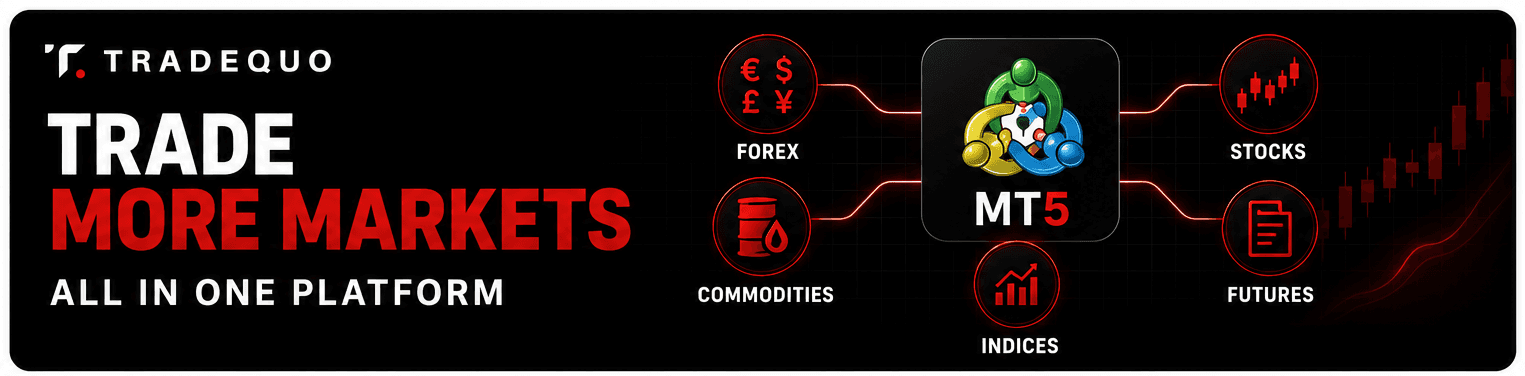
MetaTrader 5 ist eine Multi-Asset-Trading-Plattform, die von MetaQuotes Software Corp. entwickelt wurde (einem führenden Anbieter von Handelsplattformen, die weltweit von Brokern und Finanzinstituten genutzt werden). Sie wurde 2010 als Nachfolger des äußerst beliebten MetaTrader 4 veröffentlicht. Während MT4 speziell für Forex entwickelt wurde, wurde MT5 so konzipiert, dass es eine weitaus größere Auswahl an Finanzinstrumenten unterstützt, darunter Aktien, Futures, Rohstoffe und Indizes – und das alles über eine einzige, einheitliche Benutzeroberfläche.
Dieser Unterschied ist wichtiger, als die meisten Trader anfangs annehmen. Anstatt separate Plattformen für verschiedene Anlageklassen zu verwalten, konsolidiert MT5 alles in einer einzigen Umgebung mit einer gemeinsamen Benutzeroberfläche, Analysetools und einer Automatisierungs-Engine. Broker, die MT5 anbieten, sind bestrebt, Tradern die Infrastruktur zur Verfügung zu stellen, die sie benötigen, um auf den heutigen Märkten erfolgreich zu konkurrieren.
Hauptmerkmale von MetaTrader 5

Multi-Asset-Trading auf MT5
Eines der prägendsten Merkmale der MT5-Plattform ist die native Unterstützung mehrerer Anlageklassen. Während MT4 primär für das Forex-Trading konzipiert war, obwohl viele Broker die Plattform später um CFDs erweiterten, öffnet MT5 die Tür zum CFD-Trading auf Aktien, Rohstoffe wie Gold und Öl, Aktienindizes, Terminkontrakte und natürlich die gesamte Palette der Forex-Paare.
Dies ist für die Diversifikation von enormer Bedeutung. Ein Trader, der Positionen sowohl in EUR/USD als auch in Rohöl aufbauen möchte, muss nicht mehr zwischen Plattformen wechseln oder separate Konten führen. MT5 verwaltet alles an einem Ort, mit einer einheitlichen Margin-Berechnung und integrierten Berichten über alle Anlagetypen hinweg.
Für Trader auf TradeQuo bedeutet dies, dass Sie ein diversifiziertes Portfolio aufbauen können, das zwischen Forex, Rohstoffen und Indizes wechselt, ohne die Plattform jemals zu verlassen. Die Kontostruktur, die Analysen und die Execution Engine behandeln Multi-Asset-Trading als erstklassiges Feature und nicht als nachträglichen Einfall.
Es ist auch erwähnenswert, dass die Architektur von MT5 mit Blick auf eine erstklassige institutionelle Infrastruktur entwickelt wurde. Die Plattform unterstützt Hedging- und Netting-Kontotypen, was Tradern die Flexibilität gibt, Positionen so zu strukturieren, wie es zu ihrer Strategie passt, anstatt auf einen einzigen Modus festgelegt zu sein.
MT5-Charting-Tools und technische Analyse
Das Charting ist der Bereich, in dem sich MT5 seinen Ruf unter technischen Tradern redlich verdient hat. Die Plattform bietet 21 Zeitrahmen, im Vergleich zu den 9 von MT4. Das bedeutet, dass Sie die Kursentwicklung in Intervallen analysieren können, die so detailliert wie eine Minute oder so breit gefächert wie Monatskerzen sein können, wobei alles dazwischen mit einem einzigen Klick verfügbar ist.
Neben der Auswahl der Zeitrahmen umfasst die Charting-Umgebung von MT5 38 integrierte technische Indikatoren. Diese decken das gesamte Spektrum ab – von trendfolgenden Tools wie gleitenden Durchschnitten und Bollinger Bändern bis hin zu Oszillatoren wie RSI, MACD und Stochastik. Darüber hinaus stehen 44 Analyseobjekte zum Zeichnen zur Verfügung, darunter Fibonacci-Retracements, Gann-Tools, Trendkanäle und Elliott-Wellen-Markierungen.
Die Anpassungsoptionen sind enorm tiefgehend. Trader können mehrere Indikatoren im selben Chart übereinanderlegen, Indikatoren auf andere Indikatoren anwenden, Alarmbedingungen basierend auf Indikatorwerten einrichten und Chart-Vorlagen speichern, die sofort wieder geladen werden können. Für jeden, der seine Analysen auf bestimmten Chart-Setups aufbaut, ist die Möglichkeit, diese Umgebungen mit einem einzigen Klick wiederherzustellen, eine echte Zeitersparnis.
Farbschemata, Chartstile (Kerzen-, Balken-, Liniencharts) und die Sichtbarkeit des Gitters sind konfigurierbar. Und im Gegensatz zu einigen Plattformen, bei denen die Anpassung rein kosmetischer Natur ist, ist die Analyseebene von MT5 direkt mit der Handelsoberfläche verknüpft. Sie können Aufträge direkt aus dem Chart heraus erteilen, was den Weg von der Analyse bis zur Ausführung kurz und intuitiv hält.
Die Tools zur technischen Analyse von MT5 beinhalten auch den Zugriff auf Tick-Daten und tickbasierte Analysetools, die sich direkt in die Handelsoberfläche einblenden lassen. Dazu gleich mehr.
MT5-Auftragsarten und Ausführungsfunktionen
Fortgeschrittene Trader möchten nicht immer zum aktuellen Preis einsteigen. MT5 unterstützt eine umfassende Auswahl an Auftragsarten, mit denen Sie genau steuern können, wann und wie Ihre Trades ausgeführt werden.
Zu den verfügbaren schwebenden Aufträgen gehören die Standardtypen Buy Stop, Buy Limit, Sell Stop und Sell Limit sowie Buy Stop Limit und Sell Stop Limit – Auftragsarten, die von MT4 nicht unterstützt werden. Die Stop-Limit-Order ist besonders bei volatilen Bedingungen nützlich: Sie löst eine Limit-Order aus, wenn der Preis ein bestimmtes Stop-Niveau erreicht, sodass Sie bei einem Preissprung nicht zu einem ungünstigen Kurs ausgeführt werden.
MT5 unterstützt auch Teilschließungen von Positionen, sodass Sie einen Teil einer Position glattstellen können, während der Rest aktiv bleibt. Dies ist ein praktisches Werkzeug, um Gewinne aus erfolgreichen Trades schrittweise mitzunehmen, ohne das gesamte Risiko aufzugeben.
MetaTrader 5 Markttiefe, auch bekannt als Level-2-Preise, bietet Tradern Einblick in das Orderbuch. Sie können die Geld- und Briefvolumina auf mehreren Preisebenen sehen, was Aufschluss über die Liquidität und potenzielle Preisbewegungen gibt, bevor Sie eine große Order platzieren. Für Trader, die mit größeren Volumina oder illiquideren Instrumenten handeln, ist diese Transparenz eine echte Hilfe und kein bloßes Design-Feature.
Die Ausführungsmodi von MT5 umfassen Sofortausführung, Marktausführung, Börsenausführung und Ausführung auf Anfrage, die jeweils für unterschiedliche Marktstrukturen und Broker-Konfigurationen ausgelegt sind. TradeQuo bietet Zugang zur MT5-Handelsinfrastruktur, die so konzipiert ist, dass sie eine effiziente Auftragsausführung für alle verfügbaren Instrumente unterstützt.
Integrierte Tools: Wirtschaftskalender, Nachrichten und MQL5
MT5 enthält mehrere integrierte Tools, auf die sich viele Trader täglich verlassen. Das erspart Ihnen das lästige Verwalten separater Browser-Tabs oder Drittanbieter-Apps parallel zu Ihrer Handelsplattform.
Der Wirtschaftskalender, den MT5 bereitstellt, ist direkt im Terminal integriert. Er liefert geplante makroökonomische Ereignisse, Zentralbankentscheidungen, Beschäftigungszahlen und andere marktbewegende Veröffentlichungen in Echtzeit. Sie können nach Land, Auswirkungsgrad und Datumsbereich filtern, und der Kalender hebt anstehende Ereignisse, die sich auf Ihre offenen Positionen auswirken könnten, automatisch hervor.
Neben dem Kalender bietet MT5 Zugriff auf Finanznachrichten-Feeds, die vom Broker integriert werden – ebenfalls ohne die Plattform verlassen zu müssen. In Kombination mit dem Wirtschaftskalender bleiben Trader so über das Marktgeschehen informiert, ohne den Trading-Workflow zu unterbrechen.
Und dann ist da noch die Programmiersprache MQL5, die proprietäre Scripting-Umgebung von MetaQuotes, die für MT5 entwickelt wurde. Dies ist der Motor hinter den Automatisierungsfunktionen von MT5. Mit MQL5 können Entwickler und technisch versierte Trader benutzerdefinierte Expert Advisors (automatisierte Trading-Bots), eigene technische Indikatoren und Skripte erstellen, die sich wiederholende Aufgaben innerhalb der Plattform automatisieren.
Der MQL5-Marketplace, auf den direkt aus MT5 heraus zugegriffen werden kann, bietet Tausende von fertigen Expert Advisors, Indikatoren und Utilities. Sie können Tools kaufen, mieten oder kostenlos herunterladen und sofort einsetzen. Der Marktplatz unterstützt auch das Copy Trading über Signale, bei dem Sie einen Signalanbieter abonnieren können, um dessen Trades automatisch auf Ihrem Konto replizieren zu lassen.
MT5 vs MT4 Funktionen
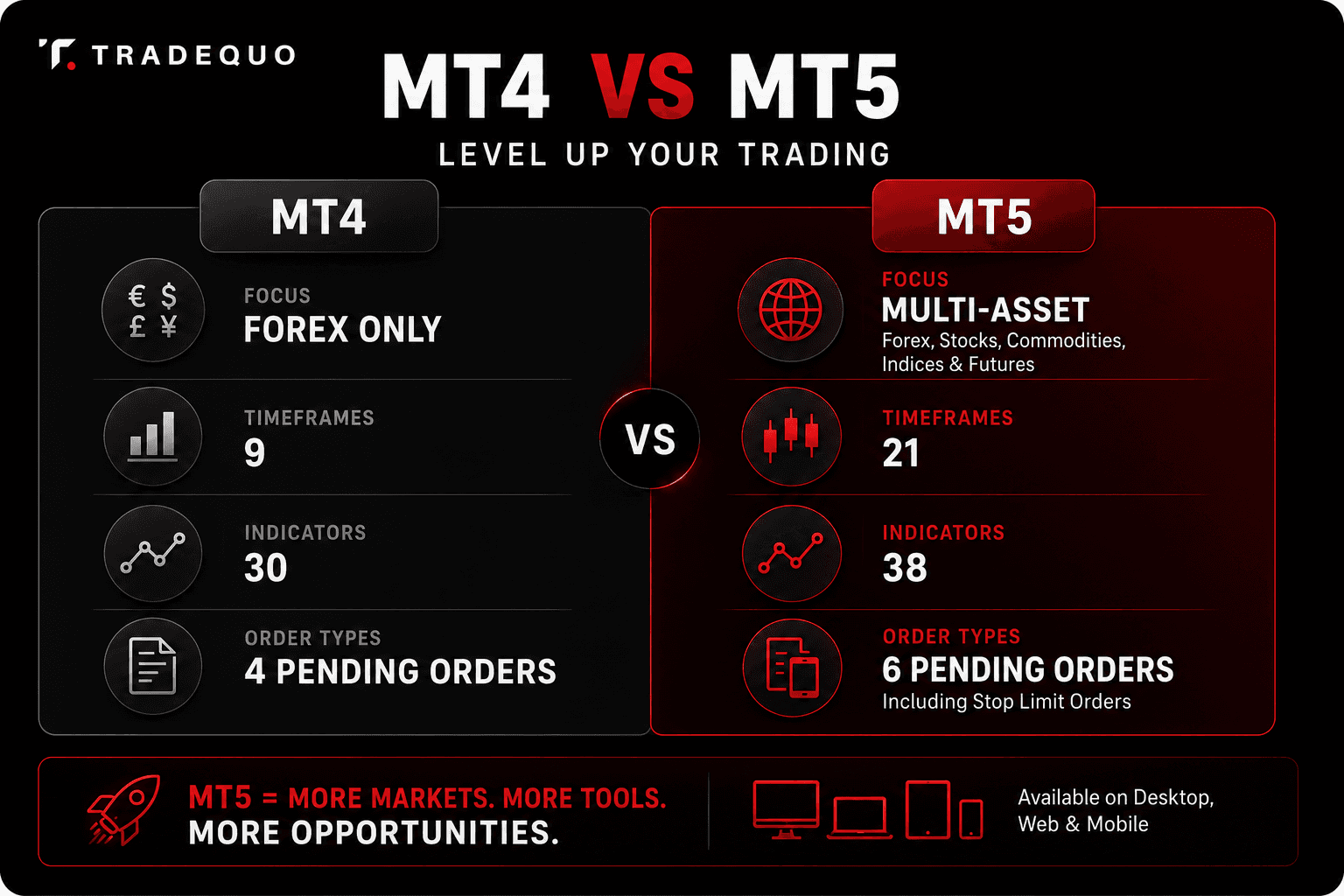
MT5 bietet mehr Zeitrahmen, Auftragsarten und Anlageklassen als MT4, und diese Unterschiede summieren sich in der Praxis. MT4 unterstützt 9 Zeitrahmen; MT5 unterstützt 21. MT4 hat 30 integrierte Indikatoren; MT5 hat 38. MT4 unterstützt 4 schwebende Auftragsarten; MT5 unterstützt 6. MT4 enthält keinen integrierten Wirtschaftskalender; MT5 hingegen schon.
Was die Automatisierung betrifft, ist MQL5 eine ausgereiftere und leistungsstärkere Sprache als das MQL4 von MT4. Sie unterstützt die objektorientierte Programmierung, was das Erstellen, Verwalten und Skalieren komplexer algorithmischer Strategien erleichtert.
Ein praktischer Hinweis: MT4 und MT5 sind nicht miteinander kompatibel. Expert Advisors, die für MT4 entwickelt wurden, können auf MT5 nicht ausgeführt werden, ohne umgeschrieben zu werden. Dies wird oft als Hürde bei der Migration genannt, aber für Trader, die neue Strategien entwickeln, ist der Start auf MT5 der sauberere Weg.
Vorteile von MetaTrader 5 für Trader
Schnellere Ausführung und Cloud-Infrastruktur
MT5 wurde mit Blick auf Performance entwickelt. Die Plattform unterstützt das multithreaded Testen von Strategien, was bedeutet, dass die Backtesting-Engine Berechnungen auf mehreren Prozessorkernen gleichzeitig ausführen kann. Für Trader, die algorithmische Strategien optimieren, verkürzt dies die Wartezeit auf Testergebnisse drastisch.
Expert Advisors können über das MetaTrader Virtual Hosting (VPS) gehostet werden, sodass automatisierte Strategien rund um die Uhr (24/7) laufen können, ohne dass Ihr eigener Computer eingeschaltet sein muss. Dies ist ein erheblicher praktischer Vorteil für jeden, der zeitkritische algorithmische Systeme nutzt.
Verbessertes Backtesting
Der Strategietester von MT5 ist hochentwickelter als der von MT4. Er unterstützt das Backtesting mit echten Ticks (Real-Tick), das tatsächliche historische Tick-Daten anstelle von interpolierten Daten verwendet, um Trades zu simulieren. Dies führt zu genaueren Leistungskennzahlen und hilft Tradern zu vermeiden, dass sie Strategien überoptimieren, die im Test gut aussehen, aber in Live-Märkten hinter den Erwartungen zurückbleiben.
Die Optimierungs-Engine kann zudem mehrere Parameterkombinationen gleichzeitig testen, und die Ergebnisse können in einem 3D-Optimierungsdiagramm visualisiert werden. Dies erleichtert es, Parameter-Cluster zu identifizieren, die konstant performen, anstatt sich auf ein einzelnes Spitzenergebnis zu verlassen.
Multi-Device-Zugriff
MT5 ist für Desktop (Windows, macOS-Zugriff in der Regel über Web-Plattform oder Kompatibilitätslösungen), als Web-Plattform, die über jeden Browser zugänglich ist, und als mobile App für iOS und Android verfügbar. Die MetaTrader 5 Mobile App bietet eine robuste Charting-Umgebung, Auftragsverwaltung und Kontoüberwachung. Die MetaTrader 5 Web-Plattform erfordert keine Installation und synchronisiert sich in Echtzeit mit Ihrem Hauptkonto.
Für TradeQuo-Kunden bedeutet dies, dass Ihre Handelsumgebung konsistent bleibt, egal ob Sie an einem Desktop-Terminal sitzen oder eine Position von Ihrem Telefon aus überprüfen.
Fazit
Die stärksten Werkzeuge und Funktionen von MetaTrader 5 zeichnen sich vor allem durch ihren Umfang und ihre Flexibilität aus. MT5 vereint Multi-Asset-Trading, ein leistungsstärkeres Charting, mehr Zeitrahmen, zusätzliche Auftragsarten, integrierte Nachrichten- und Kalendertools, Markttiefe und eine vollständige MQL5-Automatisierungsumgebung auf einer einzigen Plattform. Deshalb führen Erklärungen zu den Funktionen von MetaTrader 5 fast immer zum selben Schluss: Sie wurde für Trader entwickelt, die mehr als nur eine einfache Auftragsausführung wollen. Vom Cloud-Hosting für Ihre Expert Advisors bis hin zu einer nahtlosen MT5-Webplattform für das Trading unterwegs – das Ökosystem ist darauf ausgelegt, Ihr Wachstum als Trader zu unterstützen.
FAQ
Was sind die Hauptfunktionen von MetaTrader 5?
Zu den herausragenden Funktionen von MT5 gehören die Unterstützung von Multi-Asset-Trading für Forex, Aktien, Indizes und Rohstoffe, 21 Zeitrahmen, 38 integrierte technische Indikatoren, 6 schwebende Auftragsarten einschließlich Stop Limit, ein integrierter Wirtschaftskalender, die Sichtbarkeit der Markttiefe sowie die MQL5-Umgebung zur Erstellung von Expert Advisors und benutzerdefinierten Indikatoren.
Ist MetaTrader 5 besser als MT4?
Für die meisten aktiven Trader lautet die Antwort Ja. MT5 unterstützt mehr Anlageklassen, mehr Zeitrahmen, mehr Auftragsarten und bietet eine leistungsstärkere Automatisierungsumgebung. MT4 hat aufgrund seiner Einfachheit und der Größe seines bestehenden Ökosystems nach wie vor eine große Nutzerbasis, aber MT5 ist in fast jeder messbaren Kategorie die fähigere Plattform.
Kann man das Trading auf MT5 automatisieren?
Ja. Die MQL5-Programmierumgebung von MT5 ermöglicht es Tradern, Expert Advisors zu erstellen und einzusetzen, die Trades basierend auf definierten Regeln automatisch ausführen. Der MQL5-Marktplatz bietet zudem Tausende von vorgefertigten Automatisierungstools zum Kauf, zur Miete oder zum kostenlosen Download an.
Ist MetaTrader 5 für Anfänger geeignet?
MT5 hat eine gewisse Lernkurve, aber sie ist bewältigbar. Die Benutzeroberfläche ist logisch aufgebaut, die Charting-Tools sind übersichtlich geordnet, und der integrierte Wirtschaftskalender sowie der Newsfeed machen externe Analysetools überflüssig. Anfänger, die mit MT5 starten, gewöhnen sich an eine Plattform, die sie im Laufe ihrer Entwicklung nicht mehr wechseln müssen. TradeQuo bietet Zugang zu MT5 sowie Bildungsressourcen, die Einsteigern helfen, sich sicher auf der Plattform zurechtzufinden.