Introduction
Getting started with a new broker can feel like more work than it should be. Between reading the fine print, figuring out which account type fits your goals, and navigating funding options, what should take minutes sometimes turns into a frustrating afternoon. If you've been looking into how to open a TradeQuo account and want a clear, no-fluff walkthrough, you're in the right place.
TradeQuo is a multi-asset trading broker offering access to more than 350 markets, including forex, metals, indices, commodities, cryptocurrencies, and stocks. The platform supports both MT4 and MT5 trading platforms on desktop and mobile, making it a flexible option for beginners who want something straightforward and for experienced traders who want more control.
Let’s explore the TradeQuo account registration process, from creating your profile to funding your account and placing your first trade.
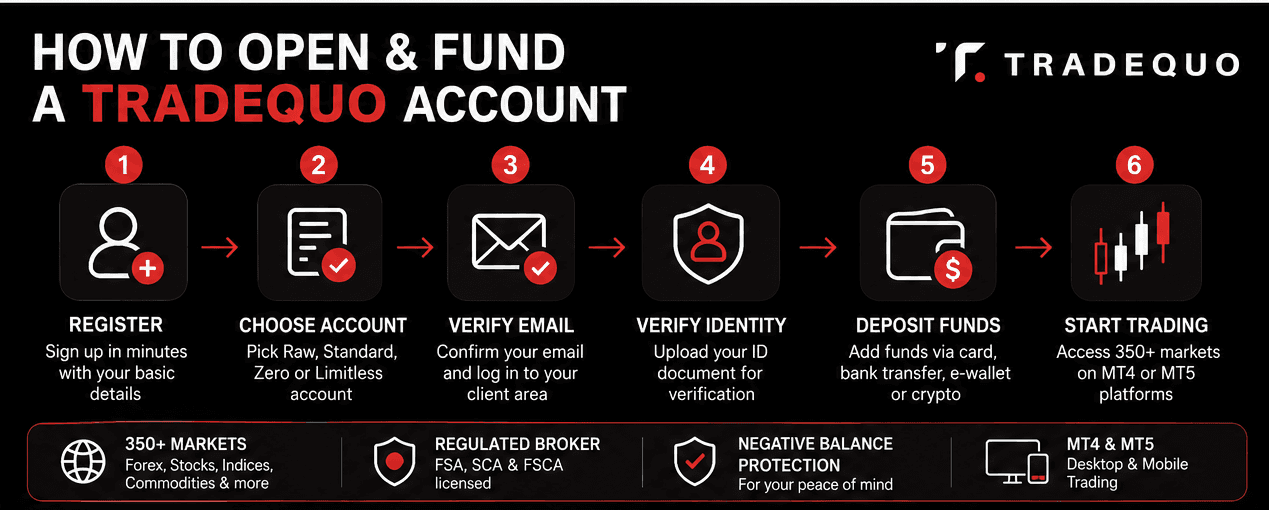
Quick Summary: Opening a TradeQuo Account
Registration takes only a few minutes through the TradeQuo website:
Traders can choose between Raw, Standard, Zero, and Limitless accounts
Identity verification requires a government-issued ID
Funding is available via cards, bank transfer, e-wallets, Apple Pay, and cryptocurrency
Deposits can start from very small amounts, depending on the payment method
How to Open a TradeQuo Account
The TradeQuo sign-up process is designed to be quick. You do not need extensive technical knowledge, and the entire registration can typically be completed in a matter of minutes from any device. Here is how it works.
Step 1: Visit the TradeQuo Website and Start Registration
Navigate to the official TradeQuo website and locate the account registration button. You will be directed to the sign-up form where you will need to provide basic personal details, including your full name, email address, country of residence, and a secure password. Double-check that all information matches your official identification documents before submitting, as this will matter during the verification stage.
Step 2: Choose Your Account Type
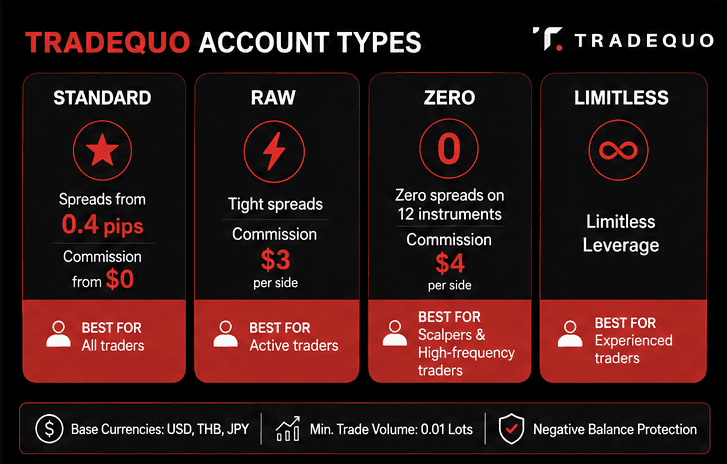
TradeQuo offers four real account types: Raw, Standard, Zero, and Limitless. Each comes with different spreads, commission structures, and leverage parameters, so understanding the differences before you commit saves you from switching accounts later.
The Standard account is the most commonly used starting point. It offers spreads on major pairs as low as 0.4 pips and a commission structure starting from zero, making it an accessible choice for traders who are still developing their strategy. The Raw account provides tighter spreads with a commission of $3 per side, which suits more active traders who prioritize execution cost efficiency.
The Zero account delivers zero spreads on 12 instruments for most of the trading day, with a commission of $4 per side and dynamic leverage up to 1:1000, making it a strong option for scalpers and high-frequency traders. The Limitless account operates on a limitless leverage model and is built for traders who understand risk management at an advanced level.
All four account types support base currencies including USD, THB, and JPY, with a minimum trade volume of 0.01 lots and negative balance protection included.
Step 3: Confirm Your Email and Log In
Once you submit the registration form, TradeQuo will send a confirmation email to the address you provided. Click the verification link to activate your profile and proceed to the TradeQuo login page. From here, you can access the client area, which is the hub for account management, funding, and accessing the trading platforms.
TradeQuo Account Verification Process
Before you can withdraw funds or access full account functionality, TradeQuo requires you to complete identity verification. This is a standard compliance requirement across regulated brokers and is in place to protect both the platform and its clients.
TradeQuo holds licenses from multiple regulatory authorities, including the Financial Services Authority (FSA) in the Seychelles, the Securities and Commodities Authority (SCA) in the United Arab Emirates, and the Financial Sector Conduct Authority (FSCA) in South Africa. Verification is part of the broker's commitment to meeting those regulatory obligations.
What Documents Will You Need
The TradeQuo account verification process requires one standard document: a valid government-issued photo ID such as a passport, national identity card, driver's license, or permanent residence card.
How to Submit Your Documents
Log in to your TradeQuo profile at my.tradequo.com, navigate to the account verification section, and upload clear, readable scans or photos of the required documents. Make sure there is no glare, cropping, or blurring on any part of the document, as this is the most common reason for delays. Once submitted, the compliance team reviews your documents and processes the verification. The turnaround time is generally fast, though it can vary depending on submission volumes and the quality of the documents provided.
Completing this step unlocks your full account capabilities and is essential before making your first deposit and beginning to trade actively.
How to Fund Your TradeQuo Trading Account
With your TradeQuo account setup complete and your identity verified, the next step is adding funds. TradeQuo has built a funding infrastructure that accommodates a wide range of preferences and regions, from traditional banking methods to digital wallets and cryptocurrency.
One of the most practical features of the TradeQuo account funding system is the absence of a fixed minimum deposit. The minimum amount you can deposit depends entirely on the payment method you choose, with some providers allowing deposits starting from as low as $1. This makes it genuinely accessible for traders who want to start small and scale as they grow comfortable with the platform.
TradeQuo also does not charge internal fees for deposits or withdrawals, though third-party payment processors may apply their own transaction charges depending on the method and region.
TradeQuo Deposit Methods and Minimum Deposit
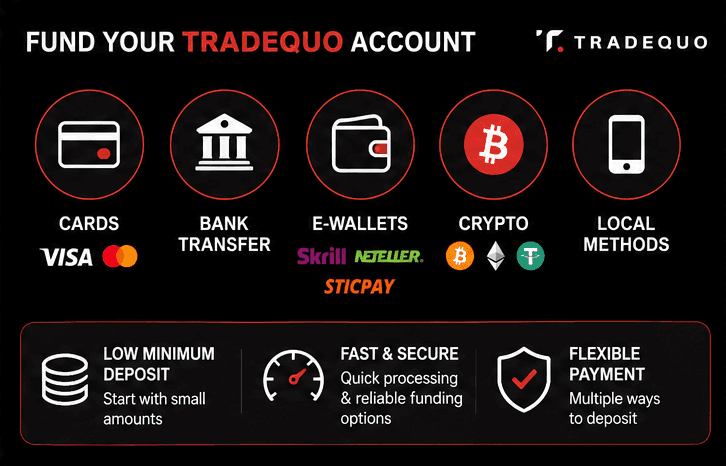
Understanding your deposit options before you fund your account is a practical step that can save you processing time and unnecessary fees. Here is a breakdown of the main TradeQuo payment methods available.
Credit and Debit Cards
Card payments (including Apple Pay) are among the fastest and most widely used deposit methods on the platform. Visa and Mastercard are supported, and deposits are generally processed instantly, giving you immediate access to trading capital. There are no fees charged by TradeQuo on card transactions, though your card issuer may apply its own currency conversion charges if you are depositing in a currency other than your card's base currency.
Bank Transfer
Bank transfers are suited to traders depositing larger amounts and those who prefer traditional financial channels. Processing times are longer than cards or e-wallets, typically requiring one to three business days, depending on your bank and region. TradeQuo supports deposits in any currency, and they will be automatically converted into the base currency of your account.
E-Wallets
TradeQuo deposit methods include support for popular e-wallets such as Skrill and Neteller, along with regional options like FasaPay and Draginpay. E-wallet deposits are typically processed instantly and offer a convenient middle ground between the speed of card payments and the security of bank transfers. Mobile money services, including Safaricom for East African users, are also supported, reflecting the platform's commitment to regional accessibility.
Cryptocurrency
For traders who prefer digital assets, TradeQuo accepts deposits in a range of cryptocurrencies and stablecoins. Supported coins include Bitcoin (BTC), Ethereum (ETH), USDT, and USDC via multiple blockchain networks, including Binance Smart Chain, Ethereum, TRON, Avalanche C-Chain, and Polygon, among others. Minimum crypto deposit amounts range from $1 to $25 USDT or USDC, depending on the network selected.
To deposit funds to TradeQuo using cryptocurrency, log into your client area at my.tradequo.com, open the menu, go to the Funds section, and select Deposit. Choose either the StableCoin or Coin tile, select your cryptocurrency and the relevant network, enter the deposit amount, and confirm. The platform will generate a wallet address specific to your account. Transfer funds from your external wallet to that address, making sure the cryptocurrency and network match exactly on both ends to avoid loss of funds.
How to Add Funds to Your TradeQuo Trading Account via Card or E-Wallet
For card and e-wallet deposits, the process is similarly straightforward. Log in to your account, navigate to the Funds section, select Deposit, choose your preferred payment method, enter the amount, and follow the on-screen steps to authorize the transaction. Most deposits via these methods reflect in your trading account almost immediately.
It is worth noting that TradeQuo follows a Money-In-Money-Out policy, meaning that withdrawals must use the same method originally used for deposits. This is a standard anti-money-laundering requirement and is worth keeping in mind when selecting your deposit method from the beginning.
Start Trading After Funding Your TradeQuo Account
Once your deposit is confirmed, your funds will appear in your TradeQuo trading account, and you are ready to begin. From the client area, you can download or log in to the MT4 or MT5 platform on desktop or mobile. TradeQuo also supports advanced charting tools such as TradingView integration and MT5 Supercharts, giving traders additional analysis capabilities.
The broker covers over 350 instruments across forex (dozens of forex pairs), commodities, metals, indices, cryptocurrencies (a wide range of cryptocurrency pairs), and stocks from the U.S., EU, and Asian markets. For traders who are new to the platform, TradeQuo offers educational resources, including Investing 101 guides, platform tutorials, video lessons, and a glossary to help you build confidence before risking real capital.
Those interested in passive exposure to the markets can also explore TradeQuo's integrated copy trading environment, where you can browse strategy profiles, view performance rankings, and subscribe to traders whose approach aligns with your risk tolerance and goals.
If you are opening a Standard or Raw account and meet the minimum deposit of $100, you may be eligible for TradeQuo's deposit bonus, which offers additional trading capital at rates between 10 and 30 percent for new verified clients using a valid promo code. The bonus is valid for 90 days and is capped at $2,000 per individual account.
FAQs
How do I open a TradeQuo account?
Visit the official TradeQuo website and complete the registration form with your personal details. Choose your preferred account type (Raw, Standard, Zero, or Limitless. Swap-free (Islamic) options are available depending on the account type), verify your email address, and then complete the identity verification process by submitting a valid photo ID through your client profile at my.tradequo.com.
What Is a Trading Account?
A trading account is a brokerage account that allows traders to deposit funds and buy or sell financial instruments such as forex, commodities, indices, stocks, or cryptocurrencies through an online trading platform.
What is the minimum deposit for TradeQuo?
TradeQuo does not impose a fixed minimum deposit. The minimum amount depends on your chosen payment method, with some options allowing you to start with as little as $1. Cryptocurrency deposit minimums range from $1 to $25, depending on the blockchain network used.
How long does TradeQuo account verification take?
Verification timelines can vary, but the process is generally completed promptly once all required documents have been submitted clearly and correctly. Submitting legible, unexpired documents without obstruction is the best way to avoid delays.
What payment methods does TradeQuo accept?
TradeQuo supports credit and debit cards, bank transfers, e-wallets, Apple Pay, and cryptocurrency deposits, including BTC, ETH, USDT, and USDC across multiple blockchain networks.
Can I open a TradeQuo account internationally?
TradeQuo accepts clients from most regions globally. However, it does not accept residents from the United States, Russia, Ukraine, and several other restricted jurisdictions. Always check the platform's regional restrictions page before registering to confirm availability in your country.
Disclaimer: Trading forex, CFDs, and cryptocurrencies involves significant risk and may not be suitable for all investors. Leveraged trading can amplify both profits and losses, and traders should ensure they understand the risks before trading. Before depositing funds, many traders test the platform using a demo account or start with a smaller deposit amount to become familiar with the trading interface, order types, and risk management tools.